
Why Whole-Dollar Round-Up Is the Ultimate Bill Splitting Hack
Quick Answer
Whole-dollar rounding rounds each diner’s share up to the next clean dollar (e.g. $34.22 becomes $35.00). The extra change is automatically redirected into the server’s gratuity pool, eliminating messy fractions, guaranteeing the total bill is fully covered, and generously rewarding hospitality staff.
- ✓Fractions of a dollar cause rounding discrepancies that frequently leave the cardholder short on group bills.
- ✓Rounding each individual share up to the nearest dollar adds a nominal 20¢ to 80¢ per person.
- ✓All pooled round-up surplus flows straight into the server’s tip, boosting gratuity from 18-20% to 21-22%.
- ✓Clear Tip Calculator includes a dedicated 1-tap "Round Up to Nearest Dollar" toggle for all bill calculations.
Restaurant Pre-Tax Bill & Tip Calculator
Calculate fair gratuity strictly on the pre-tax subtotal and split bills evenly with clean round-ups.
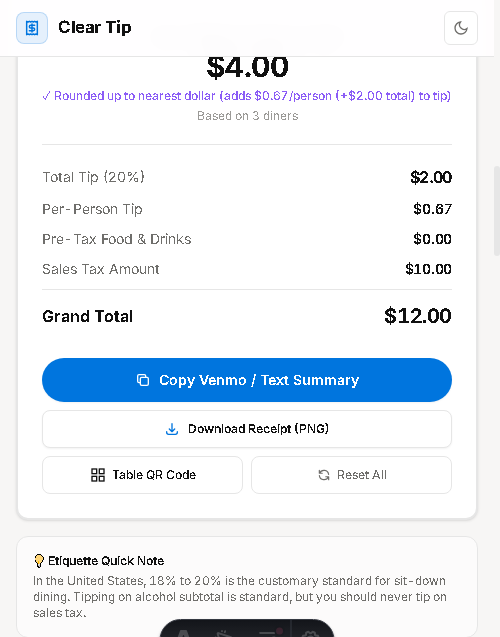
Clear Tip Calculator features a dedicated "Round up to nearest dollar" switch, instantly eliminating decimal clutter while passing spare change directly to your server.
- Calculate your party’s bill subtotal, tax, and base tip.
- Toggle the "Round up to nearest dollar" switch directly beneath the tip controls.
- Observe how individual diner shares become clean whole dollars while server tip increases.
The Problem with Awkward Cents on Group Checks
Imagine splitting an $87.50 dinner three ways: each person’s share is exactly $29.1666.... When diners enter $29.16 or $29.17 into their banking apps, rounding friction inevitable occurs. Worse, typing messy figures like "$43.78" into mobile banking slows down the end of the evening.
By implementing the Whole-Dollar Round-Up, everyone rounds up to the nearest dollar:
| Diner | Exact Share | Rounded Up Share | Extra to Tip Pool |
|---|---|---|---|
| Guest 1 | $32.18 | $33.00 | +$0.82 |
| Guest 2 | $41.65 | $42.00 | +$0.35 |
| Guest 3 | $27.42 | $28.00 | +$0.58 |
In this example, each diner paid less than $1 extra, but the server received an additional +$1.75 in hard-earned gratuity, and all payment requests were clean, round numbers.
Why Everyone Loves Clean Round Numbers
Behavioral psychology shows that consumers experience lower cognitive friction when dealing with whole numbers. Typing "$35" into Venmo feels cleaner and faster than typing "$34.37." Diners do not have to double-check their screens for misplaced decimal points or accidental typos.
Furthermore, because the extra cents are pooled directly for the waitstaff, diners feel good knowing they contributed to a more generous reward for their hospitality team. It transforms what could be a tedious mathematical chore into an act of collective generosity.
Protecting the Primary Cardholder from Shortfalls
When one generous friend places their credit card down for a table of six or eight, they take on substantial financial risk. In traditional split scenarios with exact change, friends round down or forget to include their fractional pennies. If six guests each send $24 instead of $24.85, the cardholder quietly absorbs a $5.10 deficit on top of their own dinner.
By enforcing a strict whole-dollar round-up policy, the table guarantees that all meal expenses, local sales taxes, and target tips are 100% funded. Any resulting surplus flows directly to the hard-working server rather than draining the wallet of the person kind enough to front the payment.
Cash Settlements vs. Digital P2P Apps
The whole-dollar rule shines equally well whether your party uses peer-to-peer digital wallets (Venmo, Zelle, Cash App) or physical cash bills. In cash dining, no one wants to wait for a server to bring back nickel and dime change. Throwing down clean $20 and $10 bills speeds up departure and avoids awkward coin counting at the table.
For digital payments, clean integers eliminate lingering cents balances in digital wallets that otherwise sit unused for months. To make this effortless for your group, use our Clear Tip Calculator with the "Round up to nearest dollar" toggle enabled before sending out split requests.
Frequently Asked Questions
Common questions and answers regarding round up tip to nearest dollar bill split.